Tempi di spedizione: 21 giorni lavorativi
Controlla tutte le nostre tariffe per spedizioni in Europa

Do you need multiple trays or layers inside your case? With the MyCaseBuilder Tray Builder, you can divide the available depth of your case into several custom-designed foam trays. This allows you to organize more equipment while keeping every item protected and easy to access.
The Tray Builder is particularly useful for deeper cases or for applications involving many smaller components, accessories, cables, batteries, tools, or spare parts.
Instead of placing everything in a single foam insert, the Tray Builder allows you to divide the interior into up to three removable layers:
You determine the height of each tray, giving you control over how the available space is divided. Each layer can then be designed separately with its own custom cutouts.
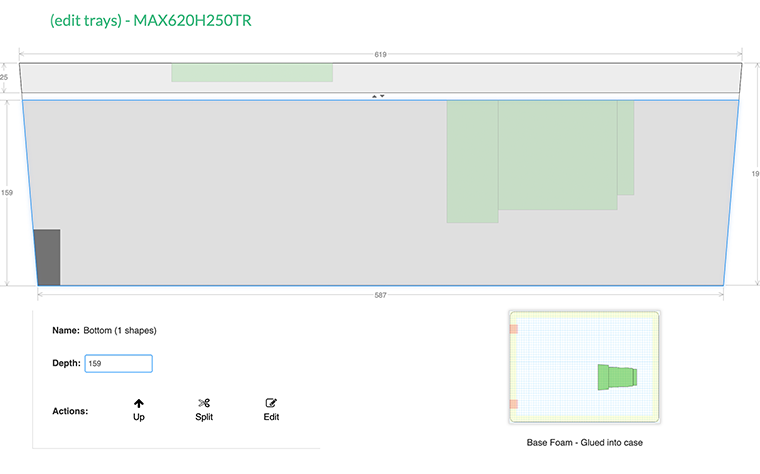
A multi-layer foam interior makes it possible to use the full depth of your case. Equipment can be grouped by function, frequency of use, or workflow. For example, you might place your main equipment in the top tray and store chargers, cables, batteries, and accessories underneath.
This keeps the contents organized and prevents smaller items from becoming mixed together or difficult to find.
Once you have divided the case into layers, you can customize each tray using the familiar MyCaseBuilder design tools. Add shapes from the extensive Shape Library, upload a photo to create a custom outline, or draw your own cutouts.
The interactive 3D preview helps you visualize how the complete multi-layer foam interior will fit inside the case before placing your order.
Each tray is made to fit precisely inside the selected case. Removable layers provide convenient access to the equipment below while helping to keep every item securely in place during storage and transport.
Whether you are protecting cameras, measuring instruments, tools, medical equipment, electronics, or technical components, the Tray Builder offers a practical way to create a compact and well-organized case.
Within the editor we now show the tray descriptions inside the Edit tray window to further clarify the details of your designs and trays. In example: Top Tray/Layer (removable)) inside the Edit tray window to further clarify In addition to that you now can also see the tray prices in the Edit trays window.
